本帖最后由 liujueshen 于 2025-12-29 20:13 编辑
今天刚完成了通过NR连通NVR实现普通摄像机刷脸开门的项目,一边整理一边分享吧!
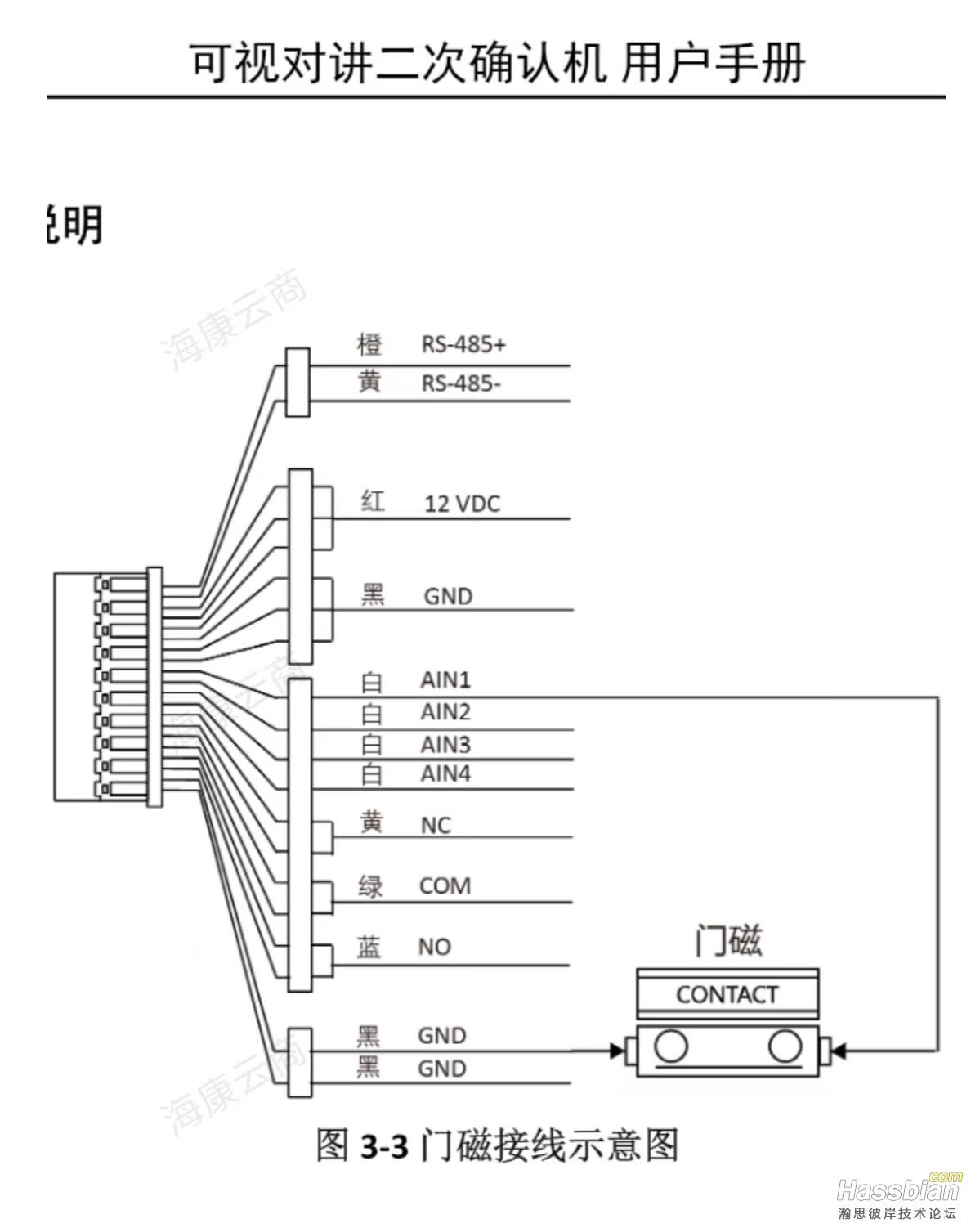
因为见到新购置带智能功能的NVR,可以用一般的摄像机就可以抓拍人用进行人面比对,而之前安装的海康门铃不是人面识别的,所以就想到能不能用来搞个人面识别开门呢? 设计思路:先要做个门磁检测门的状态,如果门是开着的就不需要再进行开门的动作,另一个最重要的作用就是,要在关上门一定时间后才能进行下一次的开门,防止刚刚关上门又比对成功把门又打开。再用HA获取NVR上报的消息进行控制开门。 海康门铃自带有个门状态检测功能,如图:
门铃接线图
接上后打开门,可以在Hikvision Doorbell里看到这样的消息: 2025-12-29 16:37:26.431 | INFO | mqtt:video_intercom_alarm:468 - Alarm <sdk.hcnetsdk.NET_DVR_VIDEO_INTERCOM_ALARM_INFO_UNION object at 0x7fae65d6f5c0> detected on door 0 2025-12-29 16:37:26.432 | INFO | mqtt:handle_device_trigger:531 - Invoking device trigger automation{'name': 'door_not_closed_0', 'type': 'not closed', 'subtype': 'Door 1'} 证明门磁开关已经可以正常触发了,但要怎么样才能使用就要查一查资料了,在Hikvision Doorbell的文档里就有这方面的说明: NOTE: For some reason there is no "door not closed" device trigger, here is a workaround: https://community.home-assistant.io/t/hikvision-doorbell-videointercom-integration/532796/537 https://community.home-assistant.io/t/hikvision-doorbell-videointercom-integration/532796/2297? You can use a device trigger in an automation by using a trigger of type Device. Check out the Automating Home Assistant guide on automations or the Automation documentation for full details. 点开链接就可以看到关于这方面的解答: With this integration you can create trigger sensor that will be something like this:
- trigger: - platform: mqtt topic: hmd/device_automation/bell_outdoor_101/door_not_closed_0/state binary_sensor: - name: 'gate_door_exterior_status' unique_id: gate_door_exterior_status icon: mdi:door device_class: door state: > true attributes: last_event: "{{ now().isoformat()}}" @TokarevSergey correct, you have a event generated by the Intercom only when the the door contact is “open” and the event is only fired once ** when the door is open, but unfortunately there is no other (new) event when the door is closed after. Because of that I had to change the reed switch from a NO (normally open) to a NC (normally close ) and invert the behaviour. So, when the door is closed for the intercom is Open and that will allow a a new trigger since by open the door it will close the magnetic switch that will open again after close the phisical door and fire an new event. It is a bit tricky but it works very well… I have two physical ways to open it: a) Using a sonoff relay BasicRFR3 (modified to have a dry contact) b) The intercom relay than can be enable by the indoor station and/or HA
Here is the sensor final sensor code (if you only have the intercom relay delete the sonoff part)
# Sensor to check the real status of the Outside Door Gate - trigger: - platform: state entity_id: switch.sonoff_1000911d6f to: - 'on' - platform: state entity_id: switch.bell_outdoor_101_door_relay_0 to: - 'on' - platform: mqtt topic: hmd/device_automation/bell_outdoor_101/door_not_closed_0/state binary_sensor: - name: 'gate_door_exterior_status' unique_id: gate_door_exterior_status icon: mdi:door device_class: door state: > {% if trigger.platform == 'state' %} {% if trigger.to_state.entity_id == 'switch.sonoff_1000911d6f' or trigger.to_state.entity_id == 'switch.bell_outdoor_101_door_relay_0' %} true {% endif %} {% else %} false {% endif %} attributes: last_event: "{{ now().isoformat()}}" When the door closes the mqtt trigger will change the status to off by returning a false. 门铃的这个门磁感应开关是超时关门报警用的,逻辑是门磁断开5秒内关上门就不发消息,如果过了5秒还未关上门就发一个消息出来,那时候再关上门也没有其它的消息出来的,所以这样是不能获取到真正的关门状态的。所以要另外想办法解决,可以不用门铃的这个功能,另外加装一个门磁感应开关,但还是想着一定要利用这个开关可以有什么办法呢?上面贴子所讲的也是一个方法,把常闭转换成常开,但不能真正解决问题的,之前是不知道什么时候关了,转换后变为不知道什么时候开了。后来想到可以用这样的方法,利用单片机做一个脉冲开关,当门磁断开的时候,输出高电平,门铃会探测到感应断开,门磁合上的时候,输出低电平,门铃会探测到感应合上;当门磁断开10秒后还没有关上门,输出端输出一个500ms的低电平再变回高电平,每10秒就一个这样的循环,等于是不断通知还没关门,直到关上门为止,HA上可以增加一下虚拟开关,当MQTT接收到未关门这个消息就打开这个开关,可以设置一个时间,比如1分钟还没有收到消息就说明门已经关上,这个方法虽然在实时性不是太准确,但对这个实时性要求也不是很大,这个方法还算比较理想,实现起来也不难。买了一个STC8G的核心板,加一个转5V的三端稳压就可以了。
单片机程序: #include "STC8G.h"
sbit DOOR = P5^5; // 门磁输入 sbit OUT = P5^4; // 输出控制
unsigned char state = 0; // 0:门关, 1:高电平等待, 2:低电平脉冲 unsigned int timer = 0; // 计时器(10ms单位)
void Timer0_Init(void) { AUXR |= 0x80; // 1T模式 TH0 = (65536-20000)/256;// 10ms @24MHz (12分频) TL0 = (65536-20000)%256; TR0 = 1; ET0 = 1; EA = 1; }
void Timer0_ISR(void) interrupt 1 { timer++; }
void main(void) { // 初始化 // P5口配置:高阻输入改为准双向口(STC8G 需设置 P5M1/P5M0 寄存器) P5M1 = 0x20; // P5.4和P5.4引脚 M1=0 P5M0 = 0x20; // P5.4和P5.5引脚 M0=0 → 配置为标准准双向口 OUT = 0; // 初始输出低 Timer0_Init(); while(1) { if(DOOR == 0) // 门关 { state = 0; OUT = 0; timer = 0; } else // 门开 { if(state == 0) // 刚开门 { state = 1; OUT = 1; timer = 0; } else if(state == 1) // 高电平等待10秒 { OUT = 1; // 保持高电平 if(timer >= 1000) // 10秒到 { state = 2; OUT = 0; // 输出低电平脉冲 timer = 0; } } else if(state == 2) // 低电平脉冲500ms { OUT = 0; // 保持低电平 if(timer >= 50) // 500ms到 { state = 1; // 回到高电平等待 OUT = 1; // 恢复高电平 timer = 0; // 重新开始10秒计时 } } } } } 到现在门状态探测就解决了。
| 


 发表于
发表于