编译请参考:
https://docs.openmqttgateway.com/
https://blog.51cto.com/u_16099269/9712453
https://hexo.skybridair.cn/post/xue-xi-bian-yi-openmqttgateway
我手上使用的是D1-MINI模块ESP8266芯片 + CC1101 模块,
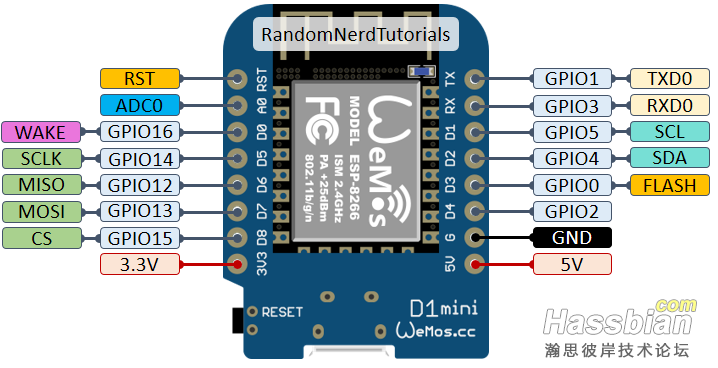

由于官方预编译的nodemcuv2-rf-cc1101固件里面的GDO2配值为GPIO0,
在ESP82666上电冷启动的时候IO0被拉低了不能正常启动,
在断开CC1101模块等ESP8266上电启动完毕后接上就能正常使用,
于是就自己修改了IO定义重新编译了,将IO0改为了IO4,IO3改为IO5,
附上的我编译的固件,
 nodemcuv2-rf-cc1101.rar
(407.38 KB, 下载次数: 0)
nodemcuv2-rf-cc1101.rar
(407.38 KB, 下载次数: 0)
下面是接线定义;
ESP8266 --- --- CC1101
GPIO4 --- --- GDO2
GPIO5 --- --- GDO0
GPIO14 --- --- SCK
GPIO12 --- --- MISO
GPIO13 --- --- MOSI
GPIO15 --- --- CSN
3V3 --- --- VCC
GND --- --- GND
启动后通过连接ESP8266发出的WIFI热点进行配置WIFI连网,MQTT等参数;
配置好后MQTT-Explorer软件连接上自己MQTT服务器,按下遥控器就可以
看到MQTT中对应的主题下面有新消息了
也可以直接在HA里面MQTT集成里面查看与测试发送消息;
//MQTT发送
home/OpenMQTTGateway/commands/MQTTto433
{"value":1234567}
//MQTT监听
home/OpenMQTTGateway/433toMQTT/#
成功后在HA配置文件里面写入自己的遥控码就可以使用了
/homeassistant/configuration.yaml
mqtt:

  binary_sensor:

    - unique_id:rf.1234567

      name: "RF.1234567"

      state_topic: "home/+/433toMQTT/1234567"

      value_template: "{{ value_json.value }}"

      payload_on: "1234567"

      off_delay: 3


  button:

    - unique_id: button.1234567

      name: "button.1234567"

      command_topic: "home/OpenMQTTGateway/commands/MQTTto433"

      payload_press: '{"value":1234567}'

      qos: "0"
| 


 发表于
发表于 
