室内一般不安装监控,风险太大,只安装了人体传感器。所以制作了一个记录活动轨迹的流。
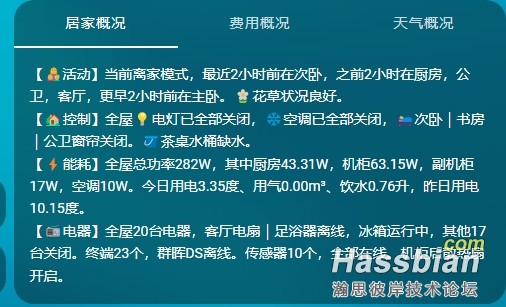
1、卡片展示,展示内容自动生成,在track_text属性中:
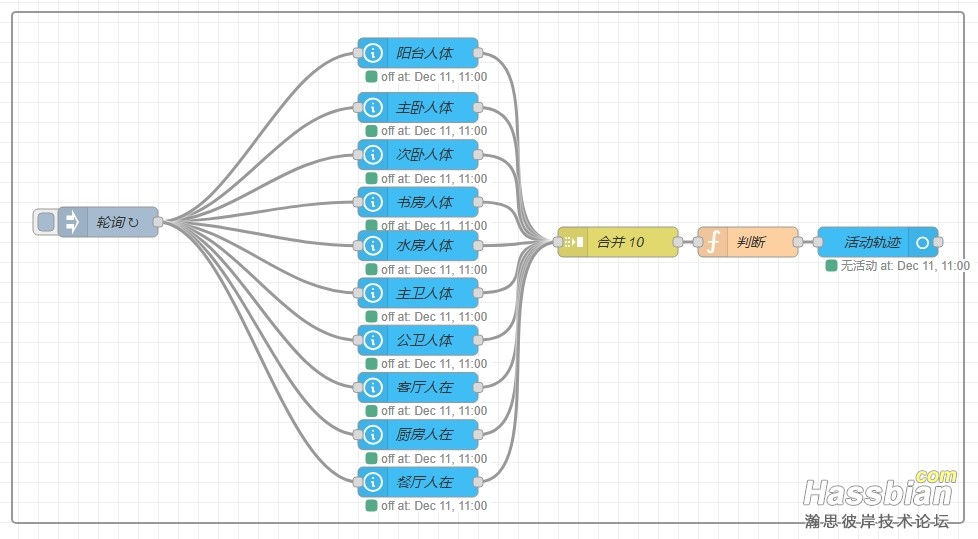
2、流程图:
3、函数代码:
// ========== 1. 传感器与房间映射关系 =============
const SENSOR_MAP = {
//    szMotion: "书桌",     // 书桌传感器
    ktMotion: "客厅",     // 客厅传感器
    ctMotion: "餐厅",     // 餐厅传感器
    cfMotion: "厨房",     // 厨房传感器
    shuifMotion: "水房",  // 水房传感器
    zwMotion: "主卧",     // 主卧传感器
    zweiMotion: "主卫",   // 主卫传感器
    cwMotion: "次卧",     // 次卧传感器
    gweiMotion: "公卫",   // 公卫传感器
    sfMotion: "书房",     // 书房传感器
    ytMotion: "阳台"      // 阳台传感器
};

// 最大历史记录数量,保存最近10次活动记录
const MAX_HISTORY = 5;

// ========== 2. 读取上一次的运行缓存 ===============
// 从系统中读取上一次保存的活动信息,包含历史记录数组,如果没有缓存,则创建一个空对象
let lastActiveInfo = flow.get("last_active_info") || {};

// 从缓存中获取历史记录,如果没有则为空数组,slice() 用于创建数组副本,避免修改原数组
let historyCache = Array.isArray(lastActiveInfo.historyCache) ?
    lastActiveInfo.historyCache.slice() : [];

// ========== 3. 处理所有传感器状态 ===============
// 创建一个空数组,用于存放当前活动的传感器信息
let active = [];

// 遍历所有传感器(SENSOR_MAP中的每个键)
for (let key in SENSOR_MAP) {
    const state = msg[key];      // 获取传感器状态(例如:true/false, "on"/"off")
    const data = msg[key + "_data"];      // 获取传感器的详细数据,包含最后变化时间
    if (!data || !data.last_changed) continue;      // 如果传感器没有数据或没有最后变化时间,跳过这个传感器
    // 检查传感器是否处于活动状态(开状态)
    if (isOn(state)) {
        const parsed = new Date(data.last_changed);         // 将最后变化时间字符串转换为日期对象
        if (isNaN(parsed.getTime())) continue;               // 检查时间是否有效,无效则跳过
        // 将活动传感器信息存入active数组
        active.push({
            sensor: key,                        // 传感器ID
            room: SENSOR_MAP[key],              // 对应房间名称
            time_ms: parsed.getTime(),          // 时间戳(毫秒数)
            time: formatTime(parsed.getTime()), // 格式化的时间字符串
            raw: data.last_changed              // 原始时间字符串
        });
    }
}

// 将活动传感器按时间从新到旧排序(最新的在前面)
active.sort((a, b) => b.time_ms - a.time_ms);

// ========== 4. 初始化输出变量 ===============
let motionRoom = "无活动";     // 当前活动房间,默认"无活动"
let motionSensor = null;       // 当前活动传感器ID
let motionTime = null;         // 当前活动时间
let motionSinceTime = null;    // 当前活动距离现在的时间(如"5分钟前")

let prevRoom = null;           // 前一个活动房间
let prevSensor = null;         // 前一个活动传感器ID
let prevTime = null;           // 前一个活动时间
let prevSinceTime = null;      // 前一个活动距离现在的时间

let track_history = [];        // 完整历史轨迹数组
let track_detail = "";         // 历史轨迹文字描述

// ========== 5. 情况1:有传感器活动时的处理 ===============
if (active.length > 0) {
    // 获取最新的活动传感器(数组第一个元素)
    const newest = active[0];

    // 设置当前活动信息
    motionRoom = newest.room;
    motionSensor = newest.sensor;
    motionTime = newest.time;
    motionSinceTime = formatDuration(Date.now() - newest.time_ms);

    // 如果有多个活动传感器,设置前一个活动信息为第二个活动传感器
    if (active.length > 1) {
        prevRoom = active[1].room;
        prevSensor = active[1].sensor;
        prevTime = active[1].time;
        prevSinceTime = formatDuration(Date.now() - active[1].time_ms);
    }

    // ======= 关键步骤:将当前活动合并到历史缓存 =======
    // 遍历当前所有活动传感器(从最新到最旧)
    for (let a of active) {
        // 移除历史缓存中相同传感器的旧记录(避免重复)
        historyCache = historyCache.filter(h => h.sensor !== a.sensor);
        // 将新记录添加到历史缓存中
        historyCache.push({
            sensor: a.sensor,
            room: a.room,
            time_ms: a.time_ms,
            time: a.time
        });
    }

    // 对historyCache按时间从新到旧排序(最新的在最前面)
    historyCache.sort((a, b) => b.time_ms - a.time_ms);

    // 限制历史缓存长度不超过MAX_HISTORY
    if (historyCache.length > MAX_HISTORY) {
        historyCache = historyCache.slice(0, MAX_HISTORY);
    }

    // 用更新后的历史缓存生成轨迹历史(此时historyCache已按时间从新到旧排序)
    track_history = historyCache.map(item => ({
        room: item.room,
        sensor: item.sensor,
        time: item.time,
        time_ms: item.time_ms,
        sincetime: formatDuration(Date.now() - item.time_ms) // 计算距离现在的时间
    }));

    // 如果没有从active中获取到前一个活动,尝试从历史缓存中获取第二个记录
    if (!prevRoom && historyCache.length > 1) {
        prevRoom = historyCache[1].room;
        prevSensor = historyCache[1].sensor;
        prevTime = historyCache[1].time;
        prevSinceTime = formatDuration(Date.now() - historyCache[1].time_ms);
    }

    // 生成轨迹文字描述
    track_detail = generateTrackText(track_history);

    // 更新并保存缓存
    lastActiveInfo = lastActiveInfo || {};
    lastActiveInfo.historyCache = historyCache.slice(); // 保存历史记录
    lastActiveInfo.track_detail = track_detail;         // 保存轨迹文字
    lastActiveInfo.last_on_time_ms = newest.time_ms;    // 保存最后活动时间戳
    lastActiveInfo.last_on_time = newest.time;          // 保存最后活动时间
    flow.set("last_active_info", lastActiveInfo);       // 写入系统缓存

    // ========== 6. 情况2:没有传感器活动时的处理 ===============
} else {
    // 如果历史缓存中有记录
    if (historyCache && historyCache.length > 0) {
        // 确保historyCache按时间从新到旧排序(最新的在前面)
        historyCache.sort((a, b) => b.time_ms - a.time_ms);

        // 用历史缓存生成轨迹历史,动态更新"距离现在的时间"
        track_history = historyCache.map(item => {
            const tms = (typeof item.time_ms === "number") ?
                item.time_ms :
                (new Date(item.time).getTime() || Date.now());
            return {
                room: item.room,
                sensor: item.sensor,
                time: item.time,
                time_ms: item.time_ms,
                sincetime: formatDuration(Date.now() - tms)
            };
        });

        // 从历史缓存中获取前一个活动信息
        if (historyCache.length > 1) {
            prevRoom = historyCache[0].room;
            prevSensor = historyCache[0].sensor;
            prevTime = historyCache[0].time;
            prevSinceTime = formatDuration(Date.now() - historyCache[0].time_ms);
        }

        // 重新生成轨迹文字描述
        track_detail = generateTrackText(track_history);

        // 保持缓存不变(可选更新)
        lastActiveInfo = lastActiveInfo || {};
        lastActiveInfo.historyCache = historyCache.slice();
        lastActiveInfo.track_detail = track_detail;
        flow.set("last_active_info", lastActiveInfo);
    } else {
        // 没有历史缓存:保持空记录
        track_history = [];
        track_detail = "";
    }

    // 当前显示无活动
    motionRoom = "无活动";
    motionTime = null;
    motionSinceTime = null;
}

// ============ 7. 数据输出 =====================
// 设置输出消息的内容
msg.payload = motionRoom;                     // 主输出:当前活动房间
msg.motion_room = motionRoom;                 // 当前活动房间
msg.motion_time = motionTime === null ? null : motionTime;  // 当前活动时间
msg.motion_sincetime = motionSinceTime === null ? null : motionSinceTime; // 多久前活动
msg.prev_room = prevRoom;                     // 前一个活动房间
msg.prev_time = prevTime;                     // 前一个活动时间
msg.prev_sincetime = prevSinceTime;           // 前一个活动多久前
msg.track_history = track_history;            // 完整历史轨迹数组
msg.track_detail = track_detail;              // 轨迹文字描述
msg.update_time = formatTime(new Date());     // 本次更新时间

// 返回处理后的消息
return msg;

// ============ 8. 工具函数 =====================

// 判断传感器是否为开启状态
// 支持多种格式:true, 1, "on", "true", "1"
function isOn(val) {
    if (val === true) return true;
    if (val === 1) return true;
    const s = String(val).toLowerCase();
    return s === "on" || s === "true" || s === "1";
}

// 将时间戳格式化为"年-月-日 时:分:秒"格式
function formatTime(ts) {
    const d = new Date(Number(ts));
    const pad = n => (n < 10 ? "0" + n : n);  // 补零函数
    return `${d.getFullYear()}-${pad(d.getMonth() + 1)}-${pad(d.getDate())} `
        + `${pad(d.getHours())}:${pad(d.getMinutes())}:${pad(d.getSeconds())}`;
}

// 将毫秒数转换为易读的时间描述
// 例如:65000毫秒 → "1分钟5秒"
function formatDuration(ms) {
    if (typeof ms !== "number" || ms < 0) return "0秒";
    const seconds = Math.floor(ms / 1000);      // 转换为秒
    const days = Math.floor(seconds / 86400);   // 计算天数
    const hours = Math.floor((seconds % 86400) / 3600);  // 计算小时
    const minutes = Math.floor((seconds % 3600) / 60);   // 计算分钟
    const secs = Math.floor(seconds % 60);               // 计算秒数

    // 按优先级返回:天 > 小时 > 分钟 > 秒
    if (days > 0) return `${days}天`;
    if (hours > 0) return `${hours}小时`;
    if (minutes > 0) return `${minutes}分钟`;
    return `${secs}秒`;
}


// 生成活动轨迹的文字描述(从近到远)
function generateTrackText(history, options = {}) {
    const {
        maxMiddleRooms = 3,  // 中间部分最多显示几个房间
        showAllMiddle = false // 是否显示所有中间房间
    } = options;

    if (!history || history.length === 0) return "";

    const len = history.length;
    const latest = history[0];
    let result = `最近${latest.sincetime}前在${latest.room}`;

    // 只有一条记录
    if (len === 1) return result + "。";

    // 处理中间部分
    if (len > 2) {
        const middleRooms = [];
        for (let i = 1; i < len - 1; i++) {
            middleRooms.push(history[i].room);
        }

        let middleText = "";
        if (showAllMiddle || middleRooms.length <= maxMiddleRooms) {
            // 显示所有中间房间
            middleText = middleRooms.join(",");
        } else {
            // 限制显示数量
            const displayRooms = middleRooms.slice(0, maxMiddleRooms);
            middleText = `${displayRooms.join(",")}等${middleRooms.length - maxMiddleRooms}处`;
        }

        result += `,之前${history[1].sincetime}在${middleText}`;
    }

    // 添加最后一条记录(倒数第一条)
    const earliest = history[len-1];
    result += `,更早${earliest.sincetime}前在${earliest.room}。`;

    return result;
}
4、下载地址:
| 


 发表于
发表于